


How to Choose the Right CRM System for Your Business
To choose the right CRM system for your business, consider your specific business needs and goals. Evaluate different CRM

To choose the right CRM system for your business, consider your specific business needs and goals. Evaluate different CRM options based on features, scalability, ease of use, and integration capabilities.
Additionally, take into account the provider’s reputation, customer support, and pricing structure to make an informed decision. Selecting the right CRM system is crucial for businesses to effectively manage customer relationships and drive growth. With numerous options available in the market, the decision-making process can be daunting.
However, by carefully assessing your business requirements and thoroughly researching CRM solutions, you can identify the system that best aligns with your objectives. This blog will guide you through the essential considerations to help you choose the most suitable CRM system for your business.
Introduction To CRM Systems
Customer Relationship Management (CRM) systems are essential tools for businesses to manage interactions with current and potential customers. Implementing the right CRM system can streamline processes, improve customer satisfaction, and boost overall productivity. When choosing a CRM system for your business, it’s crucial to understand the role of CRM in business and the benefits it offers.
The Role Of CRM in Business
CRM systems play a pivotal role in maintaining and strengthening customer relationships. They provide a centralized platform for storing customer data, interactions, and purchase history, allowing businesses to gain valuable insights into customer behavior and preferences. This enables personalized marketing, targeted sales efforts, and improved customer service, ultimately leading to increased customer retention and loyalty.
Benefits Of Implementing A Crm
- Enhanced Customer Satisfaction
- Improved Efficiency and Productivity
- Streamlined Sales and Marketing Processes
- Effective Data Management
- Better Decision-Making with Data Insights
Implementing a CRM system offers numerous benefits, including enhanced customer satisfaction, improved efficiency, and streamlined sales and marketing processes. Effective data management and the ability to make better decisions based on data insights are additional advantages that can significantly impact the overall performance and success of a business.
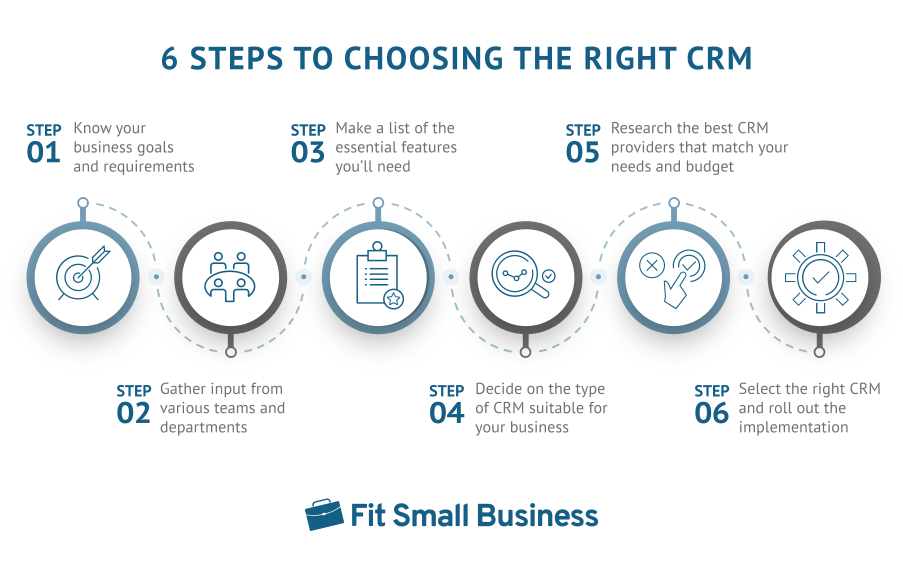
Credit: fitsmallbusiness.com
Identifying Your Business Needs
Choosing the right CRM system for your business starts with identifying your unique needs. By understanding your company size, structure, and customer interaction, you can make an informed decision that aligns with your objectives.
Assessing Company Size And Structure
Start by evaluating the size and structure of your company. Consider the number of employees and departments to determine the scale of the CRM system needed. A small business may benefit from a simpler, more streamlined solution, while larger enterprises require a robust platform to manage extensive operations.
Understanding Customer Interaction
Understanding how your customers interact with your business is crucial. Analyze the touchpoints across various channels, such as email, phone, social media, and in-person interactions. This insight will guide you in selecting a CRM system that effectively captures, tracks, and manages customer data throughout the entire journey.
Key Features To Look For In A Crm
When selecting a CRM system for your business, it is important to consider key features that will enhance your operations. Look for features such as customizable workflows, integration capabilities, mobile accessibility, analytics, and ease of use to ensure the right CRM system for your needs.
Contact Management
Contact management is a crucial feature to consider when choosing a CRM system for your business. It allows you to effectively organize and track all your customer interactions in one place. With contact management, you can easily store and access important customer information such as contact details, communication history, and notes. This feature enables you to maintain a comprehensive database of your contacts, helping you stay organized and provide personalized and efficient customer service.
Sales Automation
Sales automation is another key feature to look for in a CRM system. It streamlines your sales processes by automating repetitive tasks, saving your team time and effort. With sales automation, you can automate lead generation, follow-ups, and nurturing processes. This feature also allows you to track sales activities, monitor deals, and manage pipelines effectively. By automating these tasks, you can improve sales productivity, enhance customer engagement, and increase revenue for your business.
Analytics And Reporting
Analytics and reporting capabilities are essential for evaluating your sales and marketing efforts. Look for a CRM system that provides robust analytics and reporting features. This will enable you to gain valuable insights into your sales performance, customer behavior, and marketing campaigns. With analytics and reporting, you can track key metrics, measure your team’s performance, and identify areas for improvement. By analyzing data and generating comprehensive reports, you can make data-driven decisions and optimize your business strategies for better results.
In conclusion, when choosing a CRM system for your business, consider key features such as contact management, sales automation, and analytics and reporting. These features will empower your team to effectively manage contacts, automate sales processes, and gain valuable insights into your business performance. By selecting the right CRM system with these features, you can enhance productivity, improve customer satisfaction, and drive the growth of your business.
Comparing On-premise And Cloud-based Crm
When selecting a CRM system for your business, it’s crucial to weigh the pros and cons of on-premise versus cloud-based solutions. On-premise CRM offers greater control and security, while cloud-based CRM provides flexibility and scalability. Carefully consider your business needs and infrastructure before making a decision.
Comparing On-Premise and Cloud-Based CRM
In today’s digital age, choosing the right CRM system for your business is crucial for effective customer management. When it comes to CRM solutions, two popular options are on-premise and cloud-based systems. Each has its own set of pros and cons that you should consider before making a decision.
Pros and Cons of On-Premise Solutions
On-premise CRM solutions involve installing the software on your company’s servers and managing it internally. This option offers a few advantages, such as:
1. Control: With an on-premise CRM, you have complete control over your data and system configuration. This can be particularly important for businesses with strict security or compliance requirements.
2. Customization: On-premise systems allow for greater customization, as you have direct access to the software’s code. This enables you to tailor the CRM to suit your specific business needs.
However, there are also some drawbacks to consider:
1. Cost: On-premise CRM solutions typically require a significant upfront investment in hardware, software licenses, and IT infrastructure. Ongoing maintenance and upgrades can also add to the expenses.
2. IT Dependency: Managing an on-premise CRM system requires dedicated IT resources. You need to have a skilled IT team in place to handle installation, maintenance, and troubleshooting.
Advantages of Cloud-Based Systems
Cloud-based CRM, on the other hand, offers a more flexible and accessible solution. Here are some of its advantages:
1. Scalability: Cloud-based CRM systems allow for easy scalability. You can quickly add or remove users, storage, or features as your business needs change, without the hassle of hardware upgrades.
2. Accessibility: With a cloud-based CRM, your team can access the system from anywhere with an internet connection. This is especially beneficial for businesses with remote workers or multiple office locations.
3. Cost-effectiveness: Cloud-based systems usually follow a subscription-based pricing model, eliminating the need for upfront investments in hardware and software. You only pay for the services you need, making it a more cost-effective option for small to medium-sized businesses.
4. Automatic Updates: Cloud-based CRM providers handle software updates and security patches, ensuring that your system is always up to date. This saves you the time and effort of managing upgrades internally.
In conclusion, when choosing between on-premise and cloud-based CRM systems, it’s essential to consider the specific needs and resources of your business. On-premise solutions offer control and customization but come with higher upfront costs and IT dependency. On the other hand, cloud-based systems provide scalability, accessibility, cost-effectiveness, and automatic updates. Assessing your requirements will help you make an informed decision that aligns with your business goals.
Evaluating CRM Integration Capabilities
When choosing the right CRM system for your business, evaluating CRM integration capabilities is crucial. Assessing the system’s ability to seamlessly integrate with your existing tools and processes ensures smooth operations and data flow. It’s essential to consider factors such as API functionality, data synchronization, and customization options to make an informed decision.
When choosing a CRM system for your business, evaluating its integration capabilities with your existing tools should be a top priority. Integration is crucial for seamless data flow across different platforms, and it helps your team to work more efficiently. Below are two important factors to consider when evaluating CRM integration capabilities:
Ease Of Integration With Existing Tools
Your CRM system should integrate easily with your existing tools such as your email, calendar, and marketing automation software. It should also be flexible enough to allow for custom integration with any other tools that are unique to your business. Integration should be hassle-free and not require technical expertise. The easier the integration, the faster your team can start using the new system.
Future-proofing Through Scalability
As your business grows, so does your need for a CRM system that can scale along with it. Scalability refers to the ability of your CRM system to grow and adapt to your business needs. When choosing a CRM system, ensure that it can handle an increase in data volume, users, and features. A scalable CRM system future-proofs your business, which saves you the cost of switching to a new system in the future.
To summarize, when evaluating CRM integration capabilities, look for a system that integrates easily with your existing tools and can scale with your business needs. By doing so, you can ensure that your team can work more efficiently and that your business is future-proofed.
Security Considerations
When selecting a CRM system for your business, it’s crucial to consider security measures. Look for a system that offers robust data encryption, user authentication, and regular security updates to protect your sensitive information effectively. Ensure that the CRM system you choose complies with industry-standard security protocols to safeguard your business data.
When it comes to choosing the right CRM system for your business, security should be a top priority. Your customer data is sensitive information, and you need to ensure that it’s protected from unauthorized access, theft, and loss. In this section, we’ll discuss two crucial security considerations that you should look for in a CRM system: data protection and privacy, and compliance with regulations.
Data Protection And Privacy
Your CRM system should have robust data protection and privacy policies in place to safeguard your customer data. Look for a CRM system that uses encryption technology to keep your data secure, both in transit and at rest. Additionally, the CRM system should have strict access controls that limit who can view and edit customer data.
Another critical aspect of data protection and privacy is data backups. Your CRM system should have a reliable backup system that ensures your data is recoverable in case of a disaster or data loss. Make sure that the CRM system you choose provides regular data backups, and the backups are stored in secure offsite locations.
Compliance With Regulations
Your CRM system should comply with all relevant regulations, including GDPR, CCPA, HIPAA, and other data privacy laws. Look for a CRM system that provides features that support compliance, such as data retention policies, data deletion tools, data access logs, and audit trails.
It’s also essential to ensure that the CRM system vendor has undergone third-party security assessments and audits to ensure compliance with industry standards such as ISO 27001, SOC 2, and PCI DSS. You should also check if the vendor has any certifications or accreditations that demonstrate their commitment to data privacy and security.
In conclusion, security is a critical consideration when choosing a CRM system for your business. Look for a CRM system that has robust data protection and privacy policies and complies with relevant regulations. By doing so, you can ensure that your customer data is secure and protected from unauthorized access and theft.
User Experience And Usability
To choose the right CRM system for your business, prioritize user experience and usability. Look for a system that is intuitive and easy to navigate, with customizable features that meet your specific needs. Consider factors such as security, scalability, and integration with other tools.
When it comes to selecting the right CRM system for your business, one of the key factors to consider is the user experience and usability. A CRM system that is intuitive and user-friendly can greatly enhance productivity and efficiency within your organization. In this article, we will explore two important aspects of user experience and usability: interface design and training and support for employees.
Interface Design
The interface design of a CRM system plays a crucial role in determining its usability. A well-designed interface should be clean, organized, and easy to navigate. It should provide users with quick access to the most important features and information, allowing them to perform their tasks efficiently.
Here are some key considerations when evaluating the interface design of a CRM system:
- Is the layout intuitive and user-friendly?
- Are the menus and buttons clearly labeled?
- Is the color scheme visually appealing and not overwhelming?
- Does the system provide customizable dashboards for different user roles?
- Is the information presented in a clear and understandable format?
By assessing these aspects of the interface design, you can ensure that the CRM system you choose offers a positive user experience, leading to increased user adoption and satisfaction.
Training And Support For Employees
Another critical factor in the user experience of a CRM system is the training and support provided to your employees. Implementing a new CRM system requires proper training to ensure that your employees can effectively use the system and maximize its benefits.
Consider the following aspects when evaluating the training and support options for a CRM system:
- Does the CRM vendor provide comprehensive training materials, such as user guides and video tutorials?
- Is there a dedicated support team available to assist with any technical issues or questions?
- Does the vendor offer on-site or remote training sessions tailored to your business needs?
- Are there online forums or communities where users can share knowledge and best practices?
By ensuring that your employees receive adequate training and ongoing support, you can foster a positive user experience and enable them to fully leverage the capabilities of the CRM system.
Credit: www.salesbabu.com
Cost Analysis
When choosing the right CRM system for your business, conducting a cost analysis is crucial to ensure you make an informed decision. Understanding the pricing models and calculating the return on investment (ROI) will help you determine the most cost-effective option that aligns with your business goals. Let’s explore these factors in more detail:
Understanding Pricing Models
Before diving into the cost analysis, it’s essential to understand the different pricing models offered by CRM vendors. Here are a few common pricing models you may come across:
| Pricing Model | Description |
|---|---|
| Per User/Seat | This model charges a fixed amount for each user or seat that accesses the CRM system. It is suitable for businesses with a smaller team or those with predictable user growth. |
| Tiered Pricing | In this model, the pricing is based on different tiers or levels of functionality, allowing businesses to choose the package that suits their specific needs. It is ideal for businesses that require flexibility and scalability. |
| Pay-as-You-Go | This model charges based on usage, allowing businesses to pay only for the features or services they use. It is suitable for businesses with fluctuating CRM needs or those on a tight budget. |
By understanding the pricing models, you can narrow down your options based on your budget and requirements.
Calculating Return On Investment
Calculating the return on investment (ROI) is a crucial step in the cost analysis process. It helps you determine whether the CRM system will provide value and generate a positive return for your business. Here’s a simple formula to calculate ROI:
ROI = (Net Return on Investment / Cost of Investment) x 100
The net return on investment is the total gain or benefit you receive from using the CRM system, while the cost of investment includes all expenses associated with implementing and maintaining the system.
When calculating ROI, consider both tangible and intangible benefits. Tangible benefits include increased sales, reduced costs, and improved productivity, while intangible benefits may include better customer satisfaction and enhanced decision-making capabilities.
By calculating the ROI, you can prioritize CRM systems that offer the highest potential return and justify the investment to stakeholders.
By conducting a thorough cost analysis, understanding pricing models, and calculating the ROI, you can confidently choose the right CRM system for your business that not only meets your needs but also aligns with your budget. Remember, taking the time to evaluate the costs and benefits will ensure a successful CRM implementation that drives growth and efficiency for your business.
Reading Customer Testimonials And Case Studies
Reading customer testimonials and case studies can provide valuable insights into how a CRM system has benefited businesses similar to yours. Real-world success stories and learning from other’s experiences can help you make an informed decision when choosing the right CRM system for your business.
Real-world Success Stories
They showcase how businesses have overcome challenges, improved customer relationships, and achieved measurable results using the CRM platform. These stories can help you envision how a CRM system could impact your own business.
Learning From Others’ Experiences
By delving into customer testimonials and case studies, you can gain valuable insights from the experiences of businesses that have implemented the CRM system you are considering. Learning from their successes and challenges can guide you in understanding the potential benefits and limitations of the CRM system for your specific business needs.

Credit: financesonline.com
Making The Final Decision
After carefully evaluating the pilot testing and vendor selection criteria, it’s time to make the final decision when choosing the right CRM system for your business.
Pilot Testing
Before making a final decision, conduct a pilot test of the CRM systems you are considering. This will allow you to evaluate how each system performs in a real-world setting within your organization. Gather feedback from the end-users and key stakeholders to ensure that the chosen CRM system aligns with your business needs.
Vendor Selection Criteria
When making the final decision, consider the vendor selection criteria that are important to your business. Assess factors such as vendor reputation, customer support, integration capabilities, and data security. Verify that the vendor has a proven track record of successfully implementing CRM systems for businesses similar to yours.
Implementation And Adoption
Selecting the right CRM system for your business involves careful consideration of your specific needs and goals. Implementation and adoption are crucial steps in ensuring the system aligns with your business processes and enhances productivity. Evaluate various options to find a solution that integrates seamlessly with your operations.
Implementation and Adoption:
Choosing the right CRM system for your business is a crucial step towards enhancing customer engagement and streamlining operations. However, implementing and adopting the system is equally important to ensure its success. Here are some essential steps you need to consider when planning for the rollout, monitoring usage and feedback to ensure a successful implementation and adoption of the CRM system.
Planning the Rollout:
When planning the rollout, it’s important to involve all stakeholders, including employees, customers, and vendors. Create a detailed implementation plan that outlines the timeline, budget, and resources required. Consider the current business processes, data migration, and customization requirements. Ensure that the system is compatible with your existing technology stack and is scalable to meet future needs.
Monitoring Usage and Feedback:
Once the CRM system is implemented, it’s essential to monitor usage and gather feedback to identify any issues and make necessary adjustments. Set up tracking metrics to monitor user adoption, system performance, and customer satisfaction. Conduct regular training sessions to educate employees on the system’s features and benefits. Encourage feedback from users to address any concerns and make necessary improvements.
In conclusion, implementing and adopting a CRM system requires careful planning, monitoring, and feedback gathering to ensure its success. By following these essential steps, you can streamline operations, enhance customer engagement, and improve overall business performance.
Frequently Asked Questions
How Do I Choose The Right Crm For My Business?
To choose the right CRM for your business, consider your specific needs and budget. Evaluate features, integrations, and user-friendliness. Request demos and trials to test usability before making a decision. Ensure the CRM aligns with your business goals and can scale as you grow.
How Do I Find The Best Crm Software For My Business?
To find the best CRM software for your business, consider your specific needs and goals. Research different options, read reviews, and compare features, pricing, and customer support. Take advantage of free trials and demos to test usability. Ultimately, choose a CRM that aligns with your business requirements and helps streamline your processes.
What To Think About When Choosing A Crm?
When choosing a CRM, consider your business needs, scalability, ease of use, integrations, and cost. Ensure it aligns with your goals, can handle your customer data effectively, and supports future growth. Evaluate its features, customization options, user interface, and customer support.
Make an informed decision that suits your unique requirements.
What Factors Should A Company Consider When Choosing A Crm System That Best Suits Its Needs And Budget?
When choosing a CRM system, a company must consider its needs and budget. Factors to consider include the number of users, type of industry, customization options, integration capabilities, and level of customer support. A thorough evaluation of these factors will help a company select a CRM system that best meets its requirements.
Conclusion
Choosing the right CRM system for your business is a critical decision that can greatly impact your operations and success. By understanding your specific needs, evaluating key features, considering scalability and integration, and seeking user feedback, you can make an informed decision that aligns with your goals.
Remember to prioritize usability and customization to ensure seamless implementation and user adoption. With the right CRM system in place, you can optimize customer relationships, streamline processes, and drive growth for your business.